Many households today subscribe to internet plans advertising 300 Mbps, 500 Mbps, or even 1 Gbps. On paper, those speeds should be more than enough for streaming movies, watching live sports, and browsing online without interruptions. Yet many people still experience buffering even with fast internet. Videos pause unexpectedly, streaming quality drops from HD to blurry resolution, or live sports begin to lag at the worst possible moment.
The reality is simple: internet speed alone does not guarantee smooth streaming performance. Many other technical factors can affect how well your connection performs in real-world situations. In this guide, we’ll break down the most common reasons people experience buffering even with fast internet, and explain why high advertised speeds don’t always translate into smooth streaming.
Internet Speed vs Real-World Performance
When internet providers advertise speed, they usually refer to maximum download bandwidth. While bandwidth is important, it doesn’t represent the full picture of network performance.
Bandwidth isn’t the same as performance
Bandwidth measures how much data your connection can transfer per second. However, video streaming requires a consistent flow of data, not just a high theoretical speed.
Latency
Latency refers to the delay between sending a request and receiving a response from a server. Even with high download speeds, high latency can cause noticeable delays in loading and playback.
Packet loss
Internet data travels in small pieces called packets. When packets are lost during transmission, they must be resent, which interrupts the steady flow of data needed for streaming.
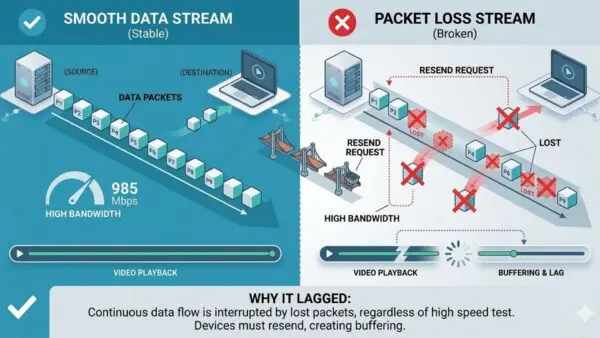
Networking research notes that packet loss and network delay can lead to stuttering or buffering because video playback requires continuous data delivery without interruption. These issues help explain why users may experience buffering even with fast internet, even when their speed tests show high bandwidth.
Source: https://www.flyriver.com/g/buffering-and-stuttering
Network Congestion During Peak Hours
Another major factor affecting streaming performance is network congestion. Internet usage tends to surge during evening hours, especially between 7 PM and 11 PM, when many households begin streaming entertainment simultaneously.
When large numbers of users share the same infrastructure, available bandwidth must be divided across the network. This can reduce the effective speed each household experiences.
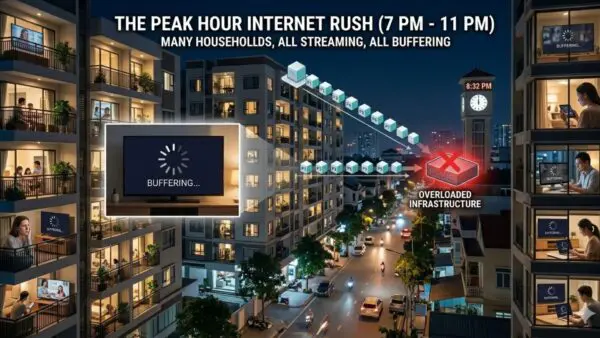
Industry analysis from Alibaba Cloud explains that streaming services often slow down during peak periods because shared network resources become overloaded with heavy traffic.
Source: https://www.alibaba.com/product-insights/why-is-my-streaming-service-buffering-even-with-high-speed-internet.html
As a result, users may notice slower streaming speeds or buffering even with fast internet, particularly in densely populated neighborhoods using shared cable networks.
ISP Throttling
In some cases, slower streaming may be caused by ISP throttling.
What ISP throttling is
ISP throttling occurs when an internet service provider deliberately slows down certain types of traffic. This can affect activities such as streaming video, downloading large files, or using bandwidth-heavy applications.
Why providers throttle traffic
ISPs may throttle traffic to:
- manage network congestion
- maintain stable service across users
- enforce data usage policies
Because video streaming uses large amounts of bandwidth—especially for high-definition and 4K content—it may be more likely to be affected.
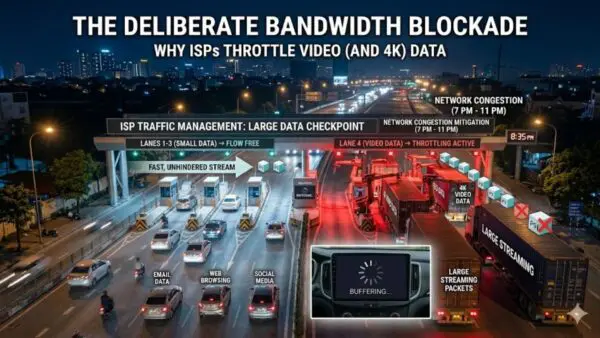
The Electronic Frontier Foundation explains that some providers use traffic shaping or throttling techniques to regulate network usage and maintain service stability.
Source: https://www.eff.org/deeplinks/2017/11/what-network-throttling
Signs throttling may be occurring
Possible indicators include:
- streaming services slowing down while speed tests remain high
- performance dropping at certain times of day
- specific platforms buffering more than others
Under these conditions, users may still encounter buffering even with fast internet, even though their overall connection speed appears normal.
Weak or Outdated Router Hardware
The router plays a critical role in distributing internet connections throughout your home. Even if your internet plan is fast, an outdated router can create performance bottlenecks.
Routers manage network traffic, assign bandwidth to devices, and maintain wireless connections. Older routers may struggle with modern streaming demands, especially when multiple devices are connected simultaneously.
Common router limitations include:
- slower processors
- limited memory
- outdated Wi-Fi standards
- poor traffic management
When routers become overloaded, they may struggle to process incoming data efficiently. This can lead to unstable connections and buffering even with fast internet, particularly during high-bandwidth activities like streaming HD video.
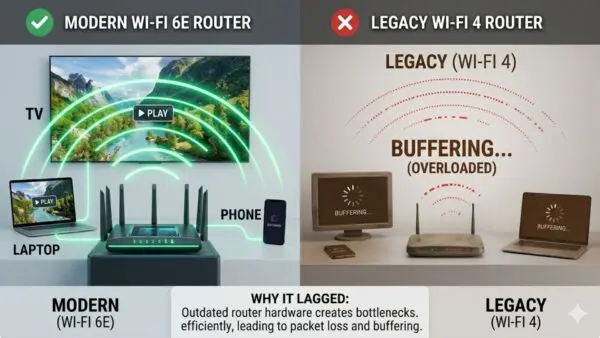
Consumer networking guides from organizations such as the Federal Communications Commission note that outdated networking equipment can significantly impact home internet performance.
Source: https://www.fcc.gov/consumers/guides/broadband-speed-guide
Your Streaming Device May Be the Bottleneck
Sometimes the problem isn’t the internet connection at all. The streaming device itself may limit performance.
Many smart TVs and older streaming boxes have limited processing power. Modern streaming platforms deliver increasingly complex video formats such as 4K, HDR, and high-bitrate streams, which require stronger hardware to decode efficiently.
Common device limitations include:
- slower processors
- limited RAM
- outdated operating systems
- weaker Wi-Fi antennas
If a device cannot process incoming video data quickly enough, playback may pause frequently or reduce video quality. In these cases, users may still encounter buffering even with fast internet, even though their connection is capable of handling the stream. You can learn more about modern streaming solutions on the SuperBox homepage.
Wi-Fi Limitations
Even with a strong internet plan and modern router, wireless connections can still introduce performance problems.
Signal interference
Many household devices operate on similar wireless frequencies as Wi-Fi networks. Microwave ovens, cordless phones, and neighboring routers can interfere with signals and reduce connection quality.
Distance from the router
Signal strength decreases significantly with distance. Devices located far from the router may struggle to maintain stable connections, increasing the likelihood of buffering. Technical networking resources highlight that interference and signal degradation are among the most common causes of unstable wireless performance.
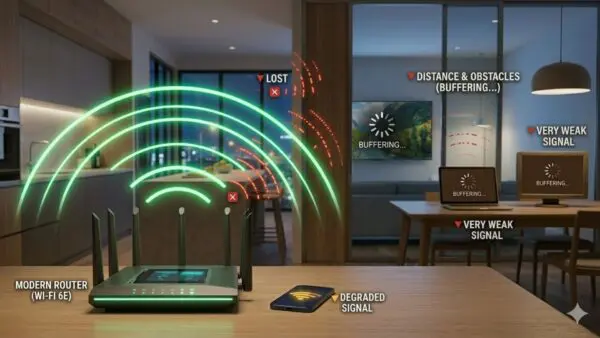
These limitations can easily contribute to buffering even with fast internet, particularly when streaming devices rely entirely on wireless connections. If you want to improve wireless stability and reduce buffering, it’s worth learning how to optimize WiFi for streaming at home.
Source: https://www.cloudflare.com/learning/network-layer/what-is-wifi-interference
Physical barriers
Walls, furniture, and building materials weaken Wi-Fi signals as they travel through a home. The more obstacles between your device and the router, the weaker the signal becomes.
Streaming Server Limitations
Not all streaming problems originate from the user’s home network. Sometimes the issue lies with the streaming service itself. Streaming platforms rely on large networks of servers known as content delivery networks (CDNs). These servers store copies of video content and distribute them to viewers around the world. When too many users access the same content simultaneously, such as during major live sports events, servers can become overloaded.
According to Amazon Web Services, CDNs help distribute traffic efficiently, but heavy demand can still strain servers during large-scale streaming events.
Source: https://aws.amazon.com/what-is/cdn
When this happens, viewers may experience reduced streaming quality or buffering even with fast internet, even if their home network is functioning perfectly.
Too Many Devices on Your Network
Modern households often connect dozens of devices to the same internet connection.
These may include:
- smartphones
- laptops
- tablets
- smart TVs
- security cameras
- gaming consoles
- smart home systems
Each device consumes bandwidth. Some devices also run background processes such as software updates, cloud backups, or security camera uploads. When multiple devices compete for bandwidth simultaneously, available capacity must be divided across them. This can reduce streaming performance and contribute to buffering even with fast internet, particularly in homes with many connected devices.
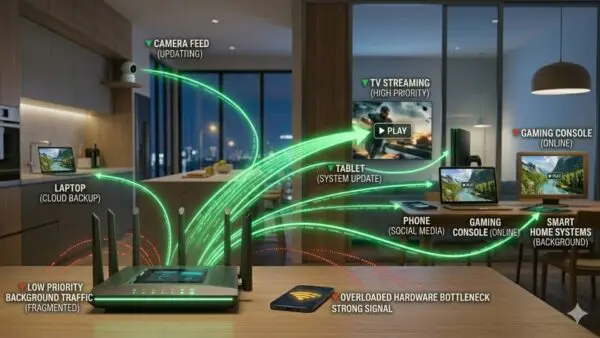
Networking experts note that background activity from connected devices can significantly affect available bandwidth for streaming applications.
Source: https://www.networkworld.com/article/3563848/how-many-devices-can-a-router-handle.html
Final Thoughts: How to Reduce Buffering Even With Fast Internet
High-speed internet plans promise impressive numbers, but real-world performance depends on far more than just download speed. Understanding these factors helps explain why streaming issues can occur even with high-speed plans. Instead of focusing only on internet speed, improving streaming performance often requires optimizing the entire home network.